
Questions about Octopods?Schedule a call
FacebookFacebook Integration

Bring Facebook into HubSpot

Manage Facebook Messenger conversations and page comments inside HubSpot, along with other messaging apps.

Messenger + Comments
7-day free trial
Facebook
HubSpot

Facebook → HubSpot

JD
AS
MK
RL

Millions of messages synced to HubSpot every month

Does this sound familiar?

  • Facebook messages sit in Meta tools, disconnected from CRM data
  • Messages and page comments are scattered across apps
  • Agents have to create HubSpot contacts manually from Messenger leads
  • Conversation history gets lost between handoffs

Bring Facebook into HubSpot with Octopods

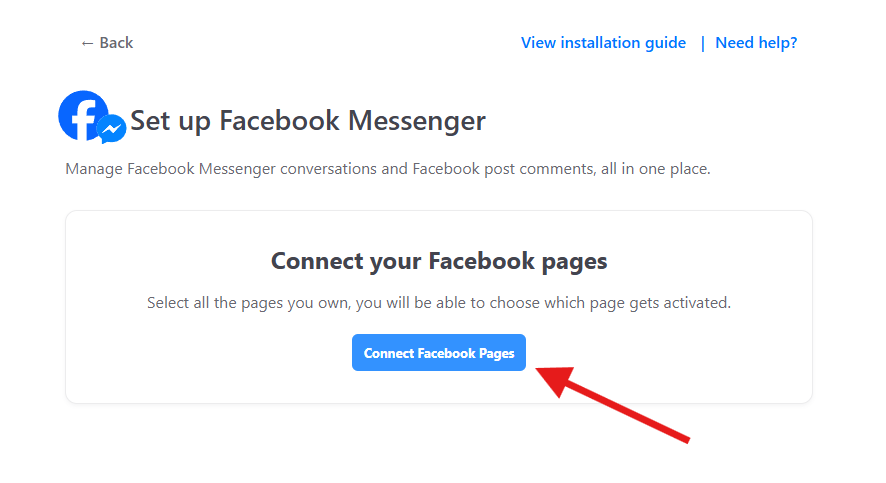
Octopods connects Facebook to HubSpot in a few simple steps.
1

Connect

Connect your HubSpot account to Octopods and choose Facebook as a channel

2

Sync

Sync Messenger conversations and page comments to your HubSpot Inbox

3

Reply

Reply to Facebook messages & comments directly from HubSpot

Connect Facebook

1. Connect

Link your Facebook Page

Why use Octopods for Facebook + HubSpot?

Built for real Messenger conversations inside HubSpot

Native HubSpot Inbox experience

  • Facebook Messenger conversations appear as standard HubSpot threads
  • Teams can assign, tag, and collaborate as usual

Two-way Messenger sync

  • Receive and reply to Facebook messages with text, media, and links
  • All synced in real time between HubSpot and Messenger

Automatic contact creation & no extra logins

  • Octopods matches Messenger users to existing contacts or creates new ones
  • Your account is created automatically using your HubSpot email
Facebook
Facebook Messenger
John Smith
Open
Hi! I saw your ad on Facebook. Can you tell me more about pricing?
You
Hi John! Thanks for reaching out. I'd be happy to help with pricing info.
Sent 2:15 PM
From Ad Campaign
CS
Synced to HubSpot

How teams use the Facebook HubSpot integration

Practical Facebook Messenger & comments use cases across the sales funnel

Lead Generation

Capture Messenger leads from ads and conversations directly in HubSpot for fast follow-ups

Customer Support

Handle Facebook support requests inside HubSpot with full conversation history and context

Sales Conversations

Keep Messenger chats tied to contacts and deals so sales teams never lose track

Post-purchase

Manage order questions, updates, and follow-ups from Facebook Messenger inside HubSpot

Frequently asked questions

Common questions about the Facebook HubSpot Integration

Yes, the Facebook HubSpot integration by Octopods syncs all incoming Facebook Messenger messages directly to your HubSpot Inbox or Help Desk. Your team can see, manage, and respond to Facebook conversations inside HubSpot just like any other channel.

Yes, every Facebook Messenger conversation is saved as a HubSpot conversation and linked to the relevant contact record. This gives your team full visibility into past messages & customer context inside the CRM.

Yes, Octopods enables two-way messaging between Facebook Messenger and HubSpot. You can reply to Facebook messages from the HubSpot Inbox, and your responses are instantly synced back to Messenger in real time.

Yes. When a new customer messages your Facebook Page, Octopods automatically matches the Messenger user to an existing HubSpot contact or creates a new contact if one doesn't exist. This keeps your CRM clean and ensures every Messenger conversation is tied to the right contact.

Yes. Octopods allows you to connect multiple Facebook Pages to one or more HubSpot Inboxes. This makes it easy to manage Messenger conversations across different brands or business units from a single place.

Ready to connect Facebook to HubSpot?

Bring Facebook Messenger conversations into HubSpot and manage social messaging like a real support and sales channel

Available in the HubSpot App Marketplace